This is a text file that instructs web robots (search engines) on how to access your website. With this file you can better control how bots access and index pages on your website.
However, it is important to clarify that it is not a way from preventing search engines from crawling your site. To keep a web page out of SERPs, you should use noindex tags or directives.
Robots.txt is accessible by typing in '/robots.txt' after the domain in your browser

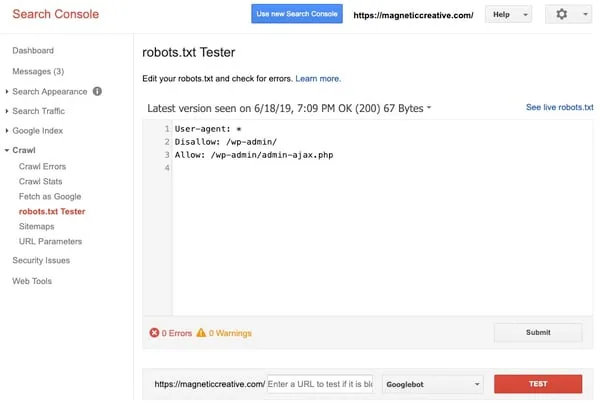
You can also use Google Search Console
Go to Settings and open the robots.txt report. It lists the robots.txt files Google found for your top 20 hosts, when each one was last crawled, and any errors or warnings. You can also request a recrawl there after you fix a problem.
Google retired the old Crawl > robots.txt Tester (pictured below) at the end of 2023. To check whether a specific page is blocked, paste its URL into the URL Inspection tool and look for "Crawl allowed?" in the results.
Despite the use of the terms "allow" and "disallow", the directives are purely advisory and rely on the compliance of the web robot.